Introduced at WWDC 2025, iOS 26 represents a seismic change to Apple's mobile operating system. This goes beyond a feature enhancement and introduces a brand new design language as well as an array of robust artificial intelligence features, that create an environment that is unequivocally a coherence, with visionary thought of the user experience for the next decade with the iPhone and beyond.
For those possibly wondering how Apple jumped from iOS 18 to iOS 26. Apple has made the choice to use a year based number for all of its major operating systems, the standardization includes iPadOS and macOS and visionOS. This represents a decision by Apple to use a consistent nomenclature within its ecosystem. With iOS 26, Apple creates a vision of a more cohesive, more intelligent, more visually breathtaking user experience for the public when it ships mid September 2025, so let's take a closer look at what we can expect.
A Dazzling New Look: The "Liquid Glass" Design
The most noticeable and obvious change in iOS 26 is it’s visual redesign. Apple calls this new design system "Liquid Glass" and it is the biggest change in style since iOS 7. Liquid Glass is inspired by visionOS layers of transparency and translucency, making the interface feel alive, three dimensional, and personal.
Liquid Glass is characterized by translucent aspects. Like glass, the user interface will now reflect and refract its environment. So a button or a menu bar will now show a blurred symmetrical view of the content or wallpaper behind it. Not only is this effect not static but it is dynamic and interacts with the positioning of your iPhone with light glinting off elements to invoke depth and reality.
Key features of the Liquid Glass design include:
- System Wide Translucency: Liquid Glass has a new look throughout the system. You can see it in notifications, in the Control Center, and in all the stock Apple apps. Additionally, Apps developers have been provided the tools to bring this look to their app as well.
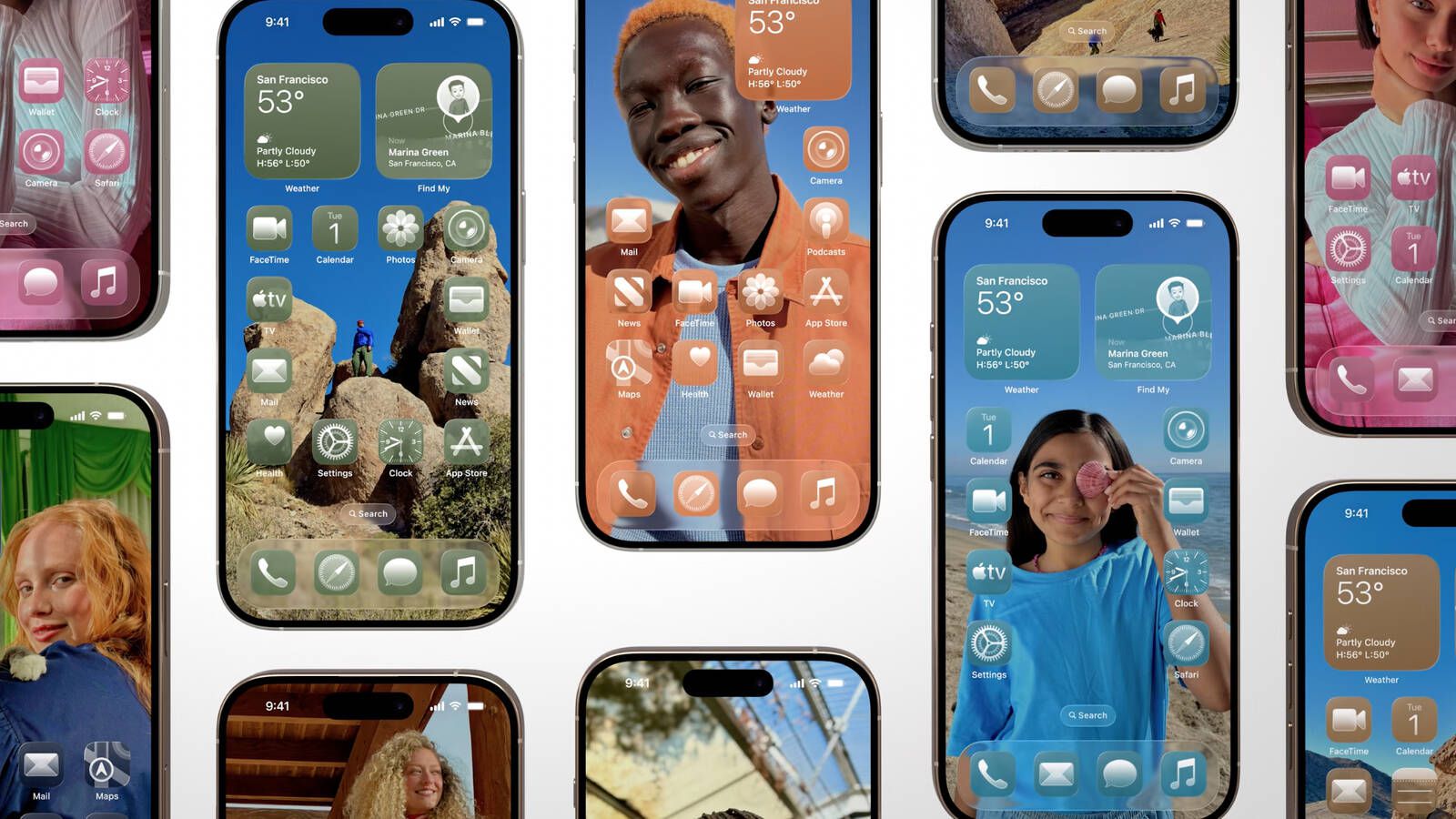
- Rounded and Refined Shapes: Where we have see "squircles" before with iOS 18, we are now seeing a pill like shape. In other words, even rectangular shaped controls now have meter long rounded shapes. Single buttons are now perfectly circular, and navigation bars are now smooth, elongated pills. These changes give it a softer, more modern feel.
- A content first design: The Liquid Glass design is meant to recede into the background to allow your content to show through as the primary. Navigation bars or controls can recede or collapse or disappear altogether without being disconnected. In Safari, for example, the tab bar collapses when you scroll down so your view of the webpage is obstacle free.
- Layered Icons: On the Home Screen, app icons and widgets are all made up of multiple layers of Liquid Glass. This gives a subtle depth to the app icons that make them feel less "2D flat" and more like real objects that animate with the light and movement from the user interaction.
Although the design is what you will notice first, iOS 26 has more impactful changes because of deeper integrations of Apple Intelligence. Apple Intelligence is a suite of AI features designed to help your iPhone be more capable, proactive, and helpful as you work through your daily tasks.
- Live translating calls and messages. Say goodbye to language barriers. Live translation is natively integrated into the Phone, FaceTime, and Messages apps. You can now converse with someone who speaks a language that you do not speak and the technology will natively translate the language for both parties using live captions or even spoken translations.
- More intelligent communication tools. The Phone app introduced Call Screening, where unknown callers will be asked for their name and reason for calling before you take the call. There is now a Hold Assist feature that will wait on hold for you and notify you when a live agent is available to assist. You can also now create polls in Messages, as well as set custom backgrounds on your conversations.
- New creative opportunities for a new level of image and text creation. Apple Intelligence powers some creative new tools. Image Playground has many more styles for image generating, including styles inspired by trending art forms. Genmoji allows you to create new emoji characters by either blending existing emoji or by simply giving the technology a text description and letting it create the emoji for you!
- Smart shortcuts and reminders. The Shortcuts app has gained some serious capabilities with new intelligent actions that utilize Apple's AI models to summarize text, generate images or simply answer questions. The Reminders app can now intelligently recommend tasks and identify if they fit the categories for what you have onscreen, including emails or websites.
- Wallet and maps improvements. The Wallet app is now your digital life hub, with the ability to scan emails to produce simplified order tracking information and support in store installment payments as well. Apple Maps is going to learn your routes for your daily travel and warn you about possible delays long before you embark on the trip.
It is the start of a world where AI is not a separate app, but rather is part of the entire operating system and acts quietly in the background to help make your life easier.
Updates to Your Favorite Apps
Besides the larger transformations, iOS 26 delivers a welcome bounty of enhancements, large and small, to many of your primary apps.
- Camera and Photos: Apple simplifies the arrangement of the camera interface to a new, simpler layout that reduces event clutter and enables the user to spend more time getting the photo just right. As for Photos app, it is now a combination of an older design and a new design where Libraries and Collections are two levels apart, the collections of distinct library snapshots disconnected. Spatial Scene takes what functions to enhance a 2D photo into a beautiful 3D photo that incorporates depth and some gentle movement.
- Apple Music: AutoMix is a new feature that, in a similar way to virtual DJs, utilizes both intelligence and knowledge of rhythmic beats to curate a seamless blend of songs into the auto mix. Lyrics Translation and Pronunciation is now also built-in too, so lyricists and wannabe songwriters can follow along with vocals in foreign languages.
- Apple Games: A new app, Apple Games, is an all in one destination for finding, playing, and playing competitive games. It has personalized recommendations, leaderboards, and a hub to find and connect with friends.
- CarPlay: The new Liquid Glass design makes its way to CarPlay, providing a car experience that is visually stunning. To make it even better, CarPlay also brings support for widgets and Live Activities, allowing you to see relevant information at one glance, with no distraction.
In conclusion, iOS 26 is a monumental release. The excellent new design is bold and visually beautiful and functional, but most importantly is the intelligent Apple Intelligence deep integration which makes the iPhone an even smarter and capable device. The new implementation digital numbering system represents a unified vision for Apple software, and the features within iOS 26 depict a clear evolutionary pathway for a strong vision of mobile computing. Now comes the next era of the iPhone, and it is more intuitive, intelligent and visually glorious than ever before.


